

Selling books shouldn't feel like shouting into a void. Yet for most authors on social media, that is exactly what it feels like. You post on Instagram, get fifty likes, and the post dies in twenty-four hours. That is the classic hamster wheel. There is a better way to get eyes on your pages without the daily grind. Pinterest for authors works differently because it is not a social network. It is a visual search engine where posts last for years, not minutes.
- Pinterest acts as a search engine, meaning your content can drive traffic for years rather than disappearing in a feed.
- You must switch to a Business Account to access detailed analytics and run ads.
- Keywords are the backbone of your strategy; use them in your display name, board titles, and pin descriptions.
- Visuals matter most, so focus on high-quality vertical images that reflect your book's genre and aesthetic.
The Big Shift: Why Pinterest Is Different
Most authors treat Pinterest like a digital scrapbook. They pin a few recipes, maybe a picture of a library, and call it a day. That wastes a powerful tool. To use Pinterest effectively, you have to stop thinking like a social media user and start thinking like a marketer using Google.
When a reader goes to TikTok, they want entertainment. When they go to Instagram, they want connection. But when they go to Pinterest, they want answers. They are planning. They are looking for "books to read this fall" or "fantasy novels with strong female leads."
This planning mindset makes Pinterest users valuable. They are active buyers. Data shows that 85% of weekly users make purchases based on pins they see. They aren't just scrolling. They are shopping.
The Longevity Factor
Social media is ephemeral. A tweet lasts about fifteen minutes. A Facebook post has a lifespan of a few hours.
A pin on Pinterest? It takes about 3.5 months just to accrue half its engagement. And it keeps going. You can publish a pin today promoting your debut novel, and three years from now, that same pin can still bring readers to your Amazon page. This compound effect is why Pinterest for authors is the best investment for those with limited time. You do the work once. You reap the rewards for a long time.
Stop Staring at a Blank Page
Publy is a distraction-free book editor with AI built in. Brainstorm plot ideas, get instant chapter reviews, or rewrite clunky paragraphs. 3 million free words included.

Setting Up Your Author Profile for Success
You cannot just use your personal account. You need features that only come with a professional setup.
1. Get a Business Account
If you already have a personal account with relevant boards, you can convert it. If your personal account is full of unrelated things like "Bathroom Renovation Ideas," start fresh. A business account gives you access to the Pinterest Analytics dashboard. This is where you see what is actually working.
2. Claim Your Website
This is a technical step, but do not skip it. Claiming your website tells Pinterest that you are the verified owner of your content. It puts your profile picture next to any pin that comes from your site. It also boosts the distribution of your pins.
3. Enable Rich Pins
Rich Pins pull metadata from your website directly onto the pin. For authors, this usually means Article Pins or Product Pins. If you sell books directly from your site, Product Pins will show the price and availability right on the feed. This increases trust and improves click-through rates.
Pinterest SEO: The Engine of Discovery
Pinterest runs on keywords. It doesn't care how popular you are. It cares about relevance. If you want your book to be found, you have to speak the language of the search bar.
Finding the Right Keywords
Start by typing a broad term into the Pinterest search bar. Try "Fantasy Books." Look at the suggested terms that appear underneath. These are the specific phrases people are searching for right now.
Make a list of these terms.
- Fantasy books for adults
- Fantasy books romance
- Dark fantasy aesthetic
These are your keywords. You need to sprinkle them everywhere.
Do not be clever with your board names. "My Scribbles" helps no one. "Writing Tips for Beginners" gets found in search.
Optimizing Your Display Name
Your name should explain who you are. Instead of just "Jane Doe," change it to "Jane Doe | Dark Fantasy Author & Writing Tips." This helps you rank when users search for those specific topics.
Board Titles and Descriptions
Every board needs a purpose. Create boards that align with your book's themes. If you wrote a historical romance set in Scotland, create boards like:
- Scottish Highlands Travel
- Historical Romance Books
- 18th Century Fashion
In the board description, write full sentences using your keywords. For example, "Explore the rugged beauty of the Scottish Highlands and discover the best historical romance books set in this era."
You can learn more about how keywords drive visibility in our guide on how to get your book on the first page of Amazon, as the principles of search intent are very similar.
Visual Strategy: What to Actually Pin
This is where many writers get stuck. You write words. You don't design graphics. However, Pinterest is a visual medium. You need images to stop the scroll.
Vertical is King
Pinterest is mobile-first. Vertical images take up more screen real estate. Aim for a 2:3 aspect ratio (e.g., 1000 x 1500 pixels). Square images get lost. Horizontal images are almost invisible.
Types of Content to Create
1. The "Aesthetic" Board
Readers love the "vibe" of a book. Create pins that capture the mood of your story.
- Character art or lookalikes.
- Settings and landscapes.
- Objects significant to the plot (daggers, letters, crowns).
2. Quotes and Teasers
Take a powerful line from your book. Put it over a moody background. Make the text large and readable. These pins are highly shareable. People save them because they relate to the sentiment, even if they haven't read the book yet.
3. Book Covers
Of course, you need to pin your book cover. But don't just upload the flat image. Place it in a lifestyle setting. Show the book next to a cup of coffee or on a cozy blanket. Mockups perform better than flat JPEGs. If you need help refining your cover before marketing, check our 10 book cover design tips to help you sell your book.
4. Educational Content
If you write non-fiction, this is huge. Create infographics that summarize your chapters. If you write fiction, you can still teach. "How to write a villain" or "Worldbuilding tips" pins can attract other writers who are also voracious readers.
2026 Data: Who Is Actually on Pinterest?
You might think Pinterest is just for recipes and weddings. The data says otherwise. As of 2026, the platform has evolved significantly.
According to Pinterest's investor reports, the global user base has continued to grow, reaching hundreds of millions of monthly active users. The most interesting shift is the rise of Gen Z. This demographic is now the fastest-growing audience on the platform. They use Pinterest to define their identity and find new interests.
If you write YA, New Adult, or trends-based fiction, your audience is here. They are leaving traditional social networks for spaces that feel less toxic and more creative.
Driving Traffic: The Funnel
A pretty pin is useless if it doesn't lead anywhere. Every pin needs a destination.
Where to Send Them?
- Direct to Amazon: This is the obvious choice. It works for "Buy Now" intent.
- Your Blog: Send them to a post related to the pin. Once they are on your site, you can capture their email.
- A Reader Magnet: Create a pin offering a "Free Prequel Story." Link it to a landing page where they have to sign up for your newsletter to get it.
Building a community is vital. You can even use Pinterest to drive traffic to your social groups. See our successful reader group guide for ideas on how to keep those new fans engaged once they arrive.
The Fresh Pin Strategy
Pinterest's algorithm prioritizes "Fresh Pins." This means new images, not just repinning the same old photo. You can create ten different pins for the same blog post. Change the text overlay. Change the background image. Test what works.
We define fresh pins as images or videos that haven't been seen before on Pinterest.
Pinterest Engineering Blog
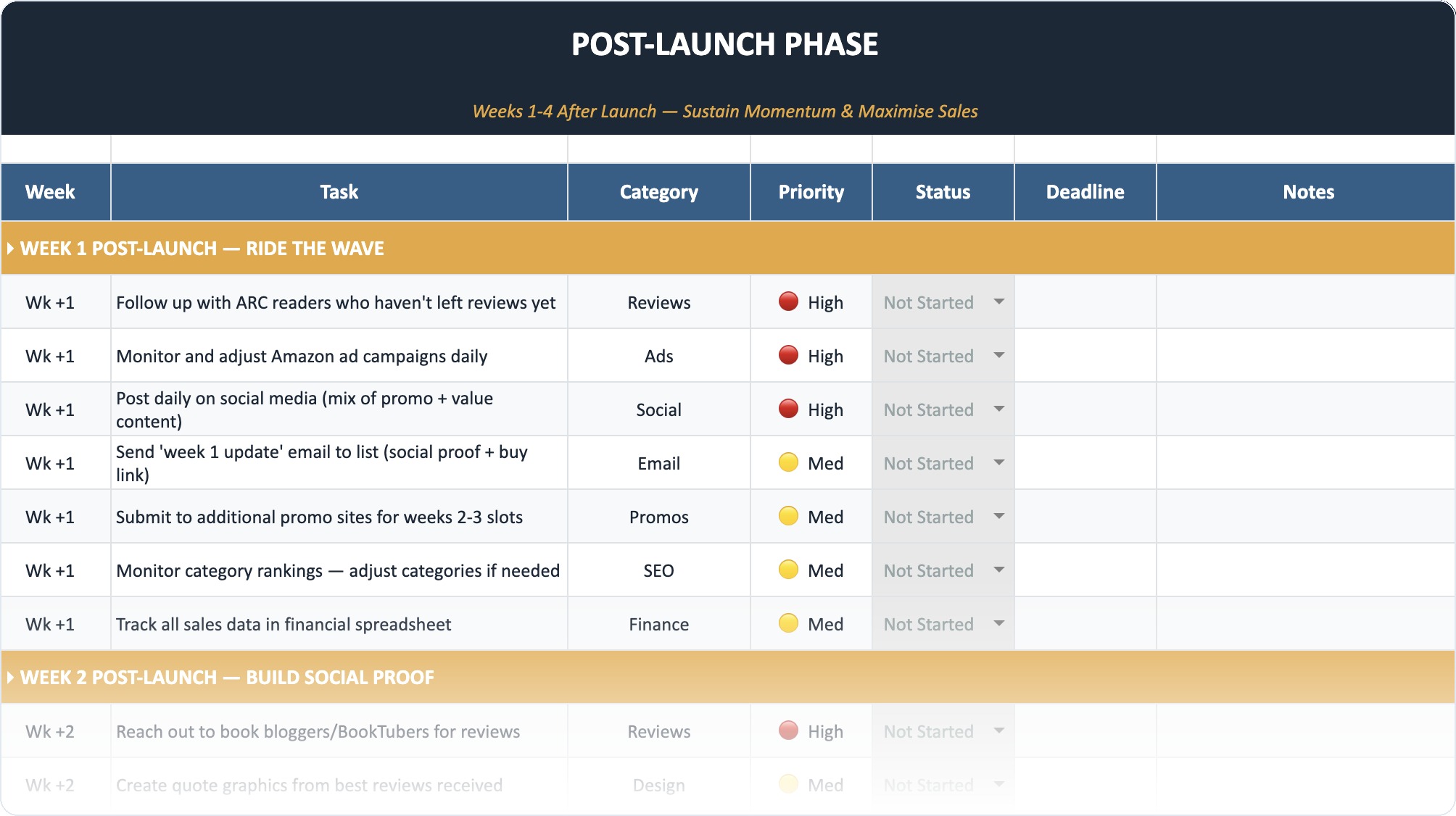
The Self-Publishing Launch Checklist (2026)
A week-by-week spreadsheet that walks you through every step of launching your book. Available as an Excel file and Google Sheet.
Advanced Tactics for Power Users
Once you have the basics down, you can ramp up your strategy.
Idea Pins
These are Pinterest's version of Stories or TikToks. They are multi-page pins that users swipe through. Unlike Instagram Stories, they do not disappear. They are great for step-by-step tutorials or "5 Books to Read If You Love X."
Group Boards
Group boards used to be the golden ticket. They are less powerful now, but still useful for beginners. These are boards owned by someone else where multiple people can pin. It gives you access to their followers. Look for high-quality group boards in your genre. Avoid spammy "Pin Anything" boards.
Pinterest Ads
If you have a budget, Pinterest Ads are cheaper than Facebook Ads. You can target people based on specific keywords. You can show your book cover to people searching for "Best Thrillers 2026." The intent is higher, so the conversion rate is often better.
Avoiding Common Mistakes
There are a few traps authors fall into. Avoid these to save time.
1. Inconsistency
You cannot pin fifty times in one day and then disappear for a month. Pinterest hates that. It looks like spam. You need a steady trickle of content. Pinning 3 to 5 times a day is a good target. You don't have to be glued to your phone; use a scheduler.
2. Broken Links
Check your pins regularly. If you link to a page that no longer exists, Pinterest will penalize you.
3. Ignoring Mobile
Check your pins on your phone. Is the text readable? If the font is too script-y or small, people will scroll past.
4. Focusing on Metrics That Don't Matter
"Monthly Views" is a vanity metric. It looks big and impressive, but it includes everyone who just scrolled past your pin. Focus on "Outbound Clicks." That is the number of people who actually left Pinterest to visit your book page.
Pinterest vs. The Rest
Is it worth your time compared to other platforms? Let's break it down.
- Pins last for years
- High purchase intent
- Less toxicity and trolling
- Slower initial growth
- Requires graphic design
- Analytics can be delayed
If you hate being on camera for TikTok, Pinterest is your haven. If you are burned out by the engagement demands of Instagram, Pinterest is your quiet corner.
Case Study: The Fiction Author
Let's look at a hypothetical example. Sarah writes Cozy Mysteries.
- Boards: She creates boards for "Cozy Reading Nooks," "Tea Recipes," "Cottagecore Aesthetic," and "Mystery Book Recommendations."
- Pins: She designs pins with quotes from her books. She makes a "Which Detective Are You?" quiz and pins the graphic.
- Result: People looking for cottagecore decor find her boards. They see her book covers mixed in. They click. They buy.
She captures readers who weren't even looking for a book initially. They were looking for a vibe.
A Note on AI and Visual Search
Visual search is getting smarter. Users can zoom in on a specific part of a pin (like a lamp or a book cover) and search for similar items. This technology is powered by advanced computer vision.
According to a report from Pinterest Newsroom, visual search queries have skyrocketed. This reinforces the need for distinct, high-quality book covers. Your cover isn't just packaging; it is a search term in itself.
Also, be aware of shopping integrations. As Pinterest Business outlines, the platform is removing friction between seeing and buying. Ensure your product metadata on your site is clean so Pinterest can import the correct price and "In Stock" status.
Creating a Routine
You do not need to spend hours a day here.
- Batch Create: Spend two hours on a Sunday making images in Canva.
- Schedule: Load them into the Pinterest native scheduler or a third-party tool.
- Engage: Spend 10 minutes a week replying to comments (comments are rare, but they happen).
- Review: Check analytics once a month.
This is a sustainable pace. It allows you to keep writing. Because the most important marketing asset you have is your next book. You need to protect your writing time. For help on balancing this, read our guide on setting realistic writing goals.
Final Thoughts
Pinterest is the introvert’s marketing powerhouse. It does not require you to dance. It does not require you to share your breakfast. It asks for organization, keywords, and patience.
The traffic won't come overnight. It builds like a snowball. Six months from now, you will be glad you started today. The readers are there, searching for their next favorite story. Make sure yours is the one they find.
Frequently Asked Questions
Is Pinterest better for fiction or non-fiction authors?
It works for both, but the strategy differs. Non-fiction authors thrive on educational infographics and "how-to" content. Fiction authors succeed by selling the "aesthetic" and mood of their story. Both can drive significant traffic if the visuals align with what the audience is searching for.
How often should I pin?
Consistency beats volume. Aim for 1 to 5 pins per day. It is better to pin 2 images every day than 50 images once a month. Use the scheduler tool to space them out so you don't flood your followers' feeds.
Do I need to pay for ads to see results?
No. Organic reach on Pinterest is still very strong compared to Facebook or Instagram. Ads can speed up the process and are useful for a book launch, but a solid organic strategy with good SEO can build a massive audience over time for free.
Can I just repost my Instagram photos?
You can, but you shouldn't just copy-paste. Instagram photos are often square (1:1), which takes up less space on Pinterest. You should resize them to vertical (2:3) to maximize visibility. Also, Instagram captions don't always work as SEO descriptions; you need to rewrite them with keywords.
What if I have no graphic design skills?
You do not need to be a pro. Tools like Canva have thousands of pre-made Pinterest templates. You just drag and drop your book cover and change the text. Simple, clean designs often perform better than cluttered, complex ones.
Should I delete underperforming pins?
Generally, no. A pin that has done nothing for six months might suddenly take off because a prominent user saved it. Unless the pin has an error or leads to a broken link, leave it there. It contributes to the overall content of your account.
Read Next: