

Over 1.4 million self-published books hit the Amazon store every single year. Most of them will never sell more than a hundred copies. The difference between the books that fade into obscurity and the ones that build a career often comes down to the production quality of the KDP Print edition.
Amazon dominates the publishing world. They control roughly 80% of US book sales. If you want to play the game, you have to play on their field.
But the rules have changed. Between the royalty shifts in mid-2025 and the new dashboard features introduced in early 2026, the old advice does not work anymore. You cannot just upload a Word doc and hope for the best.
This guide walks you through the entire KDP Print ecosystem. We look at formatting physical books, choosing the right cover templates, and navigating the confusing new royalty structures.
- KDP Print is Amazon's print-on-demand service that lets you sell paperbacks and hardcovers with zero upfront inventory costs.
- You must format your interior file as a PDF with specific margins and bleed settings to avoid rejection.
- Amazon recently cut royalty rates to 50% for lower-priced print books, so pricing strategy is now more critical than ever.
- Always order a physical proof copy before hitting publish to catch errors the digital previewer misses.
- Use KDP Print for Amazon sales but consider IngramSpark for wide distribution to libraries and indie bookstores.
What Is KDP Print and Why It Rules the Market
KDP Print stands for Kindle Direct Publishing Print. It is a print-on-demand (POD) service. Amazon does not print your book until a customer actually buys it.
When an order comes in, their machines print the book, glue the binding, cut the edges, and ship it to the customer. You never touch a box of books. You never pay for storage.
The market for this technology is exploding. The Straits Research report projects the global print-on-demand market will hit nearly $103 billion by 2034. It is not a fringe option anymore. It is the standard.
For most authors, KDP Print is the default choice because of visibility. When you publish here, your paperback and hardcover link directly to your Kindle ebook. Reviews are shared. Rankings are shared. It creates a unified product page that turns browsers into buyers.
The 2026 Reality Check
Things are different now than they were a few years ago. In 2026, authors face a more saturated market. Low-content books like journals and planners have flooded the system. Amazon has responded with stricter quality controls.
You also have more options. Hardcovers are now widely available through KDP, though they lack the dust jackets you get with traditional publishers.
The dashboard has also added features for pre-order samples. If you upload your final manuscript early, Amazon now displays up to 10% of it to customers before launch. This rewards authors who are organized and punishes those who upload "placeholder" files.
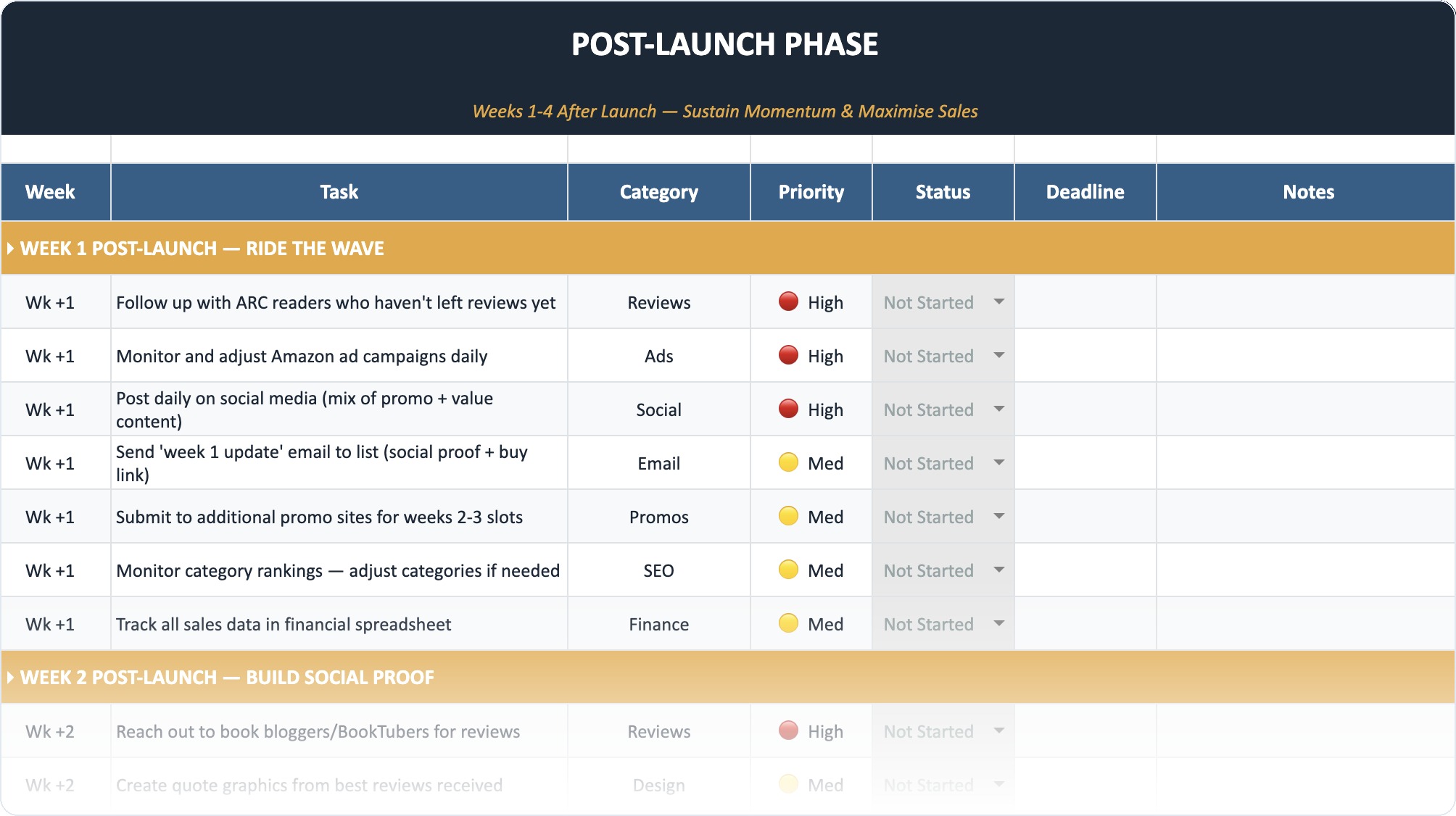
The Self-Publishing Launch Checklist (2026)
A week-by-week spreadsheet that walks you through every step of launching your book. Available as an Excel file and Google Sheet.
The Money Talk: Royalties and Pricing
Let's talk about cash before we talk about art. You need to know if this is profitable.
Historically, KDP offered a flat 60% royalty rate on print books sold on Amazon marketplaces. You took the list price, multiplied it by 0.60, and subtracted the printing cost. The remainder was your profit.
That changed in June 2025. Amazon updated their royalty structure for lower-priced books. If your paperback is priced below a certain threshold (around $10 in the US), your royalty rate drops to 50%. This was a massive blow to authors of novellas and short nonfiction.
How to Calculate Your Take-Home Pay
Suppose you write a 300-page standard paperback.
- Printing Cost: Roughly $4.50 (varies by ink type).
- List Price: $15.99.
- Royalty Rate: 60%.
Math: ($15.99 x 0.60) – $4.50 = $5.09 profit per book.
If you price that same book at $9.99 to be competitive, you might trigger the lower 50% tier depending on current regional rules.
Math: ($9.99 x 0.50) – $4.50 = $0.49 profit per book.
You can see the danger. You must run these numbers before you decide on a final page count or trim size. Authors who ignore the new rate tables end up making pennies.
Always price your physical book at least $2.00 above the "zero royalty" break-even point. This gives you room to run discounts or absorb future printing cost hikes without going into the negative.
KDP Print vs. IngramSpark: The Big Debate
You cannot discuss KDP Print without mentioning its main rival, IngramSpark. Many professional authors use both. They use KDP for Amazon sales and IngramSpark for everything else.
Here is how they stack up in 2026.
| Feature | KDP Print | IngramSpark |
|---|---|---|
| Setup Fee | $0 (Free) | $49 (Often waivable with codes) |
| Amazon Reach | Perfect integration | Good, but sometimes shows "Out of Stock" |
| Bookstores | Weak (Expanded Distribution is flawed) | Excellent (Industry standard) |
| Hardcovers | Case laminate only (printed on board) | Case laminate + Dust Jackets |
| Print Quality | Standard/Variable | Generally Higher/Consistent |
| Ease of Use | Beginner friendly | Steeper learning curve |
- Free to upload
- Integrated with Amazon ads
- Unified dashboard for ebook and print
- Fast proof shipping
- No dust jacket option for hardcovers
- "Expanded Distribution" takes 20% extra cut
- Paper quality is thinner
- No returns program for bookstores
If you want to know more about keeping costs down, check out our guide on what is the cheapest way to print a book to see how different trim sizes affect your bottom line.
Stop Staring at a Blank Page
Publy is a distraction-free book editor with AI built in. Brainstorm plot ideas, get instant chapter reviews, or rewrite clunky paragraphs. 3 million free words included.

Step-by-Step Guide to Publishing
Publishing a physical book is harder than an ebook. The files are stricter, and the errors are permanent. Once a book is printed and shipped to a reader, you cannot patch it like software.
Phase 1: The Interior File (Formatting)
This is where 90% of authors fail. You cannot upload a standard Word document and expect it to look like a book. KDP Print requires a PDF.
Margins and Gutter
Physical books have a "gutter." This is the inner margin where the pages are glued into the spine. If you do not leave enough white space here, your reader will have to break the spine to read the words near the center.
For a 300-page book, you need a gutter of at least 0.625 inches (16mm). KDP offers a calculator for this, but many beginners guess and get it wrong.
Bleed vs. No Bleed
This confuses everyone.
- No Bleed: This is for standard novels. The text stays inside the margins. There is a white border around every page.
- Bleed: This is for picture books or distinct design elements. The ink runs all the way to the edge of the paper.
If you select "Bleed" in your setup, your PDF file must be physically larger than the book size. You need to add 0.125 inches to the top, bottom, and outside edge. If you submit a 6×9 PDF for a 6×9 book with bleed, KDP will reject it. It needs to be 6.125 x 9.25.
If you struggle with this, you might need to learn how to create an interior layout that looks professional using tools like Vellum or Adobe InDesign rather than Word.
Phase 2: The Cover Art
Your ebook cover is just a front image. Your print cover is a single PDF sheet that wraps around the entire book. It includes the back cover, the spine, and the front cover.
You cannot design this until you know your exact page count. The page count determines the spine width. If you guess, the spine text will drift onto the front cover or disappear onto the back.
Cover Template Checklist:
- Resolution: Must be 300 DPI. Anything less looks pixelated in print.
- Barcode: You can leave a white box for KDP to place a barcode, or you can embed your own.
- CMYK Color: Screens use RGB (light). Printers use CMYK (ink). Convert your colors or they will look muddy and dark when printed.
Need a visual? You can use a free 3D book cover generator to see how your flat design wraps around a 3D object.
Phase 3: The Dashboard Details
Log in to KDP and create a paperback. You will walk through three tabs.
Tab 1: Details
Title, subtitle, author name, and description. This connects to your Author Central page.
Tab 2: Content
This is where you upload files.
- ISBN: KDP will give you a free one. Do not take it if you want to be a professional publisher. A free KDP ISBN lists "Independently Published" as the publisher of record. It marks you as an amateur to bookstores. Buy your own ISBNs for self-publishers so you own the metadata.
- Print Options: Choose "Black & white interior with cream paper" for fiction. White paper causes eye strain for long text. Use white paper for non-fiction or textbooks.
Tab 3: Rights & Pricing
Select "All territories" unless you sold foreign rights. Set your price. Check the "Expanded Distribution" box if you are not using IngramSpark.
The Quality Control Problem
We have to be honest about the physical product. KDP Print is a utilitarian service. It is designed for speed and cost, not luxury.
Users often report inconsistent print quality. One copy might be perfect. The next copy, ordered a week later, might have pages cut slightly crooked or ink that looks faded. This happens because KDP uses multiple printing facilities across the globe. Each machine is calibrated slightly differently.
Paper quality is another common complaint. The standard paper (55 GSM) is slightly thinner than what you find in a trade paperback from a "Big 5" publisher. It can have a "newsprint" feel to it. It is perfectly readable, but it does not feel premium.
If you are publishing a graphic novel or a photo book, KDP Standard Color is often disappointing. It looks washed out. Premium Color looks fantastic but costs so much that you will have to price your book at $30 just to break even.
Hardcovers on KDP
KDP introduced hardcovers a few years ago. They are "Case Laminate." This means the artwork is printed directly onto the hard board cover. It is shiny and durable.
However, KDP does not offer cloth binding or dust jackets. If you want the classic look of a fantasy novel with a removable paper jacket, you cannot get it here. You must go to IngramSpark or a private offset printer.
Hardcovers also require a minimum page count of 75 pages. If you write short children's books, you might be locked out of this format.
Marketing Your Physical Book
Once the book is live, you have advantages you don't get with ebooks.
Author Copies: You can order copies of your own book at the printing cost (e.g., $4.50). You do not pay the retail price. Order 20 copies. Sign them. Sell them directly to readers at local events. This is often where indie authors make their highest profit margin per unit.
Goodreads Giveaways: You can run a giveaway on Goodreads for print copies. This generates hype and gets your book added to "Want to Read" lists.
The "Thud" Factor: Send physical copies to influencers. An email with a PDF attachment is easy to ignore. A package on the doorstep that makes a "thud" when it lands is hard to ignore.
Don't forget to leverage your other content. If you have written about 10 things I wish I knew before self-publishing, link that in your newsletter when you launch the print book. It builds trust.
Also, check out our 10 writing tips for beginners to ensure the words inside the book are as good as the cover on the outside.
Common Technical Nightmares
You will likely face errors during the upload process. The "Previewer" tool is your best friend and worst enemy.
"The fonts are not embedded."
This is the most common error. When you save your PDF, you must go into the settings and ensure all fonts are embedded in the file. If you use a fancy font for chapter headings and don't embed it, KDP's printers will replace it with a generic font or reject the file.
"Images are less than 300 DPI."
You might have an image that looks great on your screen. But screens only need 72 DPI. Print needs 300. If you drag a photo from a website into your book, it will look blurry in print. KDP will flag this. You need high-resolution source files.
"Text outside the safe zone."
The safe zone is the area inside the margins where text is safe from being cut off. If your page numbers are too close to the bottom edge, the guillotine that trims the book might slice them off. Move everything inward by 0.125 inches.
Is KDP Print Right for You?
According to industry analysis on market dominance, Amazon is the gatekeeper of the majority of sales. You cannot ignore them.
But you do not have to be exclusive.
The smartest strategy for 2026 is often "Amazon First."
- Publish the Paperback and Hardcover on KDP Print.
- Use a free KDP ISBN or your own.
- Do not select "Expanded Distribution" on KDP.
- Take the exact same files and upload them to IngramSpark.
- On IngramSpark, select "Global Distribution" but exclude Amazon (since you are already there directly).
This gives you the best of both worlds. You get the higher royalties and Prime shipping speed of KDP for Amazon customers. You get the wide reach of IngramSpark for bookstores and libraries.
Writing the book is only half the battle. Producing a professional print product is the other half. It takes patience. You will probably order three proof copies before you get the margins right. You will fight with the cover template. But holding that physical object in your hands? That feeling never gets old.
If you are still stuck on the story itself, try using plot twist ideas to fix your narrative before you worry about paper weight.
Frequently Asked Questions
Can I publish a spiral-bound book on KDP?
No. KDP Print only supports paperback (perfect bound) and hardcover (case laminate). They do not offer spiral, wire-o, or saddle-stitch binding. For those formats, you need to use a service like Lulu or a local printer.
How long does it take for my print book to be approved?
Typically, it takes 24 to 72 hours for KDP to review your files. If there are formatting errors, they will email you. Once live, the product page usually appears on Amazon within a few hours, though the "Look Inside" feature can take a week to generate.
Do I need my own barcode?
No. KDP will automatically generate a barcode based on your ISBN and place it on your back cover for free. However, if you have a specific design in mind, you can upload a cover PDF that already includes a barcode. Just check the box in the dashboard that says "My cover has a barcode."
Why is my book showing "Out of Stock" on Amazon?
This is a common glitch with print-on-demand. Sometimes, Amazon's algorithm decides not to show the "Buy Button" if they don't have a copy printed yet, even though the whole point is POD. Usually, this resolves itself in a few days. Ordering a copy yourself can sometimes "wake up" the system.
Can I change my book size after publishing?
No. The trim size (e.g., 6×9) is locked to the ISBN. If you want to change the size of your book, you must unpublish the current version and publish a brand new version with a new ISBN. You cannot just swap the file.