
You Published the Book. Do You Actually Know If It Made Money?
Here’s what most indie authors do: they check their KDP dashboard, glance at the number, feel something (good or bad), and move on. No tracking. No system. No clarity on whether that £400 ad spend actually brought in £600… or cost them £200.
QuickBooks doesn’t understand KENP page reads. Xero doesn’t know what a 70/35 royalty split means. And that Google Sheet you started in January? Three tabs in and abandoned by February.
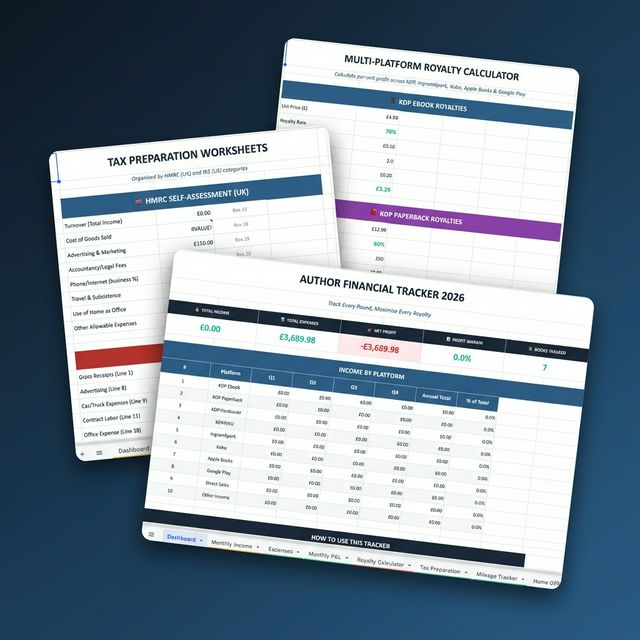
This spreadsheet was built from the ground up for how authors actually earn, spend, and file taxes.

Dashboard: Your entire author business on one screen
10 Purpose-Built Sheets. Zero Guesswork.
Open the file. Enter your numbers. Everything else calculates automatically.
Dashboard
Your entire author business on one screen. Total income, expenses, net profit, and margin update in real time. Platform breakdown with quarterly totals and annual percentages.
Monthly Income Tracker
Individual columns for KDP Ebook, Paperback, Hardcover, KENP, IngramSpark, Kobo, Apple Books, Google Play, Direct Sales and Other. Stacked bar chart + pie chart included.
Expense Tracker
100 rows with 15 author-specific categories. Dropdown selectors for category and tax-deductible status. Auto-generating pie chart shows where your money goes.
Monthly P&L Statements
Auto-generated profit & loss for every month. Green for profit, red for loss. Bar chart + trend line show your trajectory.
Multi-Platform Royalty Calculator
Calculate your exact per-unit royalty for 7 platforms. Factors in delivery costs, printing costs, retailer discounts, and royalty tiers. Change any input and watch it recalculate.
Tax Preparation Worksheets
HMRC Self-Assessment mapped to SA103 box numbers. IRS Schedule C mapped to line numbers. All pulling automatically from your data via SUMIFS.
Mileage Tracker
50 rows for business travel. Auto-calculates deduction at HMRC 45p/mile (or change to IRS 67¢/mile). Total flows into your Tax Preparation sheet.
Home Office Calculator
Two methods: Proportional (sq footage %) and HMRC Flat Rate (£10/£18/£26). Recommends whichever gives you the higher deduction. Feeds into tax sheet.
Quarterly Tax Estimator
UK Payments on Account + US Quarterly dates with payment tracking. Quick estimator calculates your bill based on income and personal allowance. Know how much to set aside.
Annual Summary
3-year YoY comparison, 20-title bestseller tracker, and Marketing ROI across 7 ad channels with spend, revenue, ROI %, and CPA. Green/red formatting shows what works.

Royalty Calculator: Know your exact per-unit profit on every platform
Platforms Tracked

Tax Preparation: HMRC and IRS categories mapped to your actual filing forms
15 Author-Specific Expense Categories

Annual Summary: Year-over-year comparison and bestseller performance tracking
🔧 Built for Excel. Works in Google Sheets.
The file is an .xlsx with every formula pre-built. Open it in Excel or upload to Google Sheets. All formulas use SUMIFS (not SUMPRODUCT), so everything works across both platforms without modification. Dropdown menus, conditional formatting, and charts all transfer cleanly.
Who This Is For
Indie authors publishing on multiple platforms who need one place to see all their numbers
Self-publishers spending money on ads, editors, and covers who want to know their actual ROI
Authors preparing for tax season who want categorised, accountant-ready records
Anyone treating their writing as a business, not a hobby
📦 What You Get
✓ 1 Excel file (.xlsx)
✓ 10 purpose-built sheets
✓ Every formula pre-built
✓ 6 auto-generating charts
✓ Dropdown category selectors
✓ Red/green conditional formatting
✓ Google Sheets compatible
✓ HMRC + IRS tax mapping
Every day without a system is a day you’re guessing instead of growing. The authors who scale are the ones who know their numbers.
You’re going to love this.
Frequently Asked Questions
Does this work in Google Sheets?
Yes. All formulas use SUMIFS (not SUMPRODUCT), so everything works in both Microsoft Excel and Google Sheets without modification. Dropdown menus, conditional formatting, and charts all transfer cleanly.
What platforms does it track?
The tracker covers Amazon KDP (ebook, paperback, hardcover, KENP), IngramSpark, Kobo, Apple Books, Google Play Books, and direct sales.
Does it handle UK and US taxes?
Yes. The Tax Preparation sheet maps to both HMRC Self-Assessment (SA103 box numbers) and IRS Schedule C (line numbers). All figures pull automatically from your data.
Can I track multiple books?
Yes. The Annual Summary sheet tracks up to 20 titles with bestseller performance and year-over-year comparison.
Is this a one-time purchase or subscription?
One-time purchase. No monthly fees. You get an .xlsx file that you own forever.
What expense categories are included?
15 author-specific categories: Cover Design, Editing, Formatting, Marketing/Ads, Software/Tools, ISBN/Copyright, Printing/Proofs, Website/Hosting, Professional Development, Office/Equipment, Travel/Conferences, Freelancer/VA, Mileage/Travel, Home Office, and Other.