

Illustrations are vital in children’s books. They enhance the readability of the text and bring the book to life. In this post, you will learn how to illustrate a children’s book, even if you do not consider yourself to be the best artist!
You have five options when it comes down to illustrations for your children’s book. The most common two are to either hire a professional illustrator or do it yourself.
But, if you do not have a budget for paying an illustrator, you will have to learn how to do it yourself...

- 7 Reasons Why Children's Book Illustrations Matter
- How do i illustrate my own book? Your Options:
- Option 1 – How To Illustrate A Children's Book by hand.
- Options 2 & 3 – How to Illustrate a Children's Book Digitally
- Option 4 – Hiring a professional illustrator
- Option 5 – AI Generated Book Illustrations ?
- Simple Children's Book Illustrations That Everybody Loves
- Tips to help you illustrate your first children's picture book
- Children's Book Illustration FAQs
In this post, I will discuss why it is crucial to illustrate children’s books and the best way to go about getting the illustration done through each of the five methods.
7 Reasons Why Children’s Book Illustrations Matter

Kids enjoy reading illustrated books over regular, text-only books, which appear boring to them. Therefore, illustrations in children’s books are doubtlessly vital. Below I address the importance of artwork in children’s books and the role it plays.
1. It motivates children to read
One of the benefits of illustrations in kids’ books is that it motivates them to read. Colorful images on books make children want to pick them up and flick through the pages even if they cannot comprehend the storyline.
They are, in fact, the first motivational factors that help kids develop positive reading habits.
2. Illustrations strengthen visual thinking.
Illustrations in children’s books enable them to connect emotionally with the drawn objects they observe.
The pictures also improve how they reason and connect concepts with the text.

3. Improves listening
Children’s books with pictures help them become better listeners. In read-aloud books, children sit and listen to the story without talking, paying attention to the illustrations. This assists the child in developing their listening skills.
4. Boosts engagement

An image in children’s books boosts engagement between them and the teachers or parents.
The pictures give conversations as the young readers can comfortably discuss what they see, what various characters are doing, and the story’s happenings.
This builds the kids’ confidence and improves their communication skills.
5. Engagement
For many children, picture books are more than just a story; they are also a fun-filled learning experience. The colorful illustrations and engaged characters help to bring the story to life, making it more relatable and enjoyable for young readers.
6. Build language skills
Picture books often contain simple language and repeating phrases, which can help to build confidence and fluency in beginning readers.
In addition, the illustrations can provide valuable clues about the meaning of unfamiliar words, helping children to develop important skills in vocabulary and comprehension.

7. Illustrations refine children’s skills.
Illustrations help them to conceptualize and trigger their imagination hence reinforcing analogical thinking. With picture books, children can relate objects with pictures and texts that go along with them.
The Self-Publishing Launch Checklist (2026)
A week-by-week spreadsheet that walks you through every step of launching your book. Available as an Excel file and Google Sheet.

How do i illustrate my own book?
Your Options:
- Drawing and coloring or painting the illustrations yourself by hand.
- Drawing using an iPad/Tablet.
- Drawing using a USB drawing tablet and computer.
- Hiring a professional illustrator
If you’re looking to illustrate your book, you have a few different options depending on your skills. You could hand-draw or paint the illustrations yourself and take high-quality pictures or scans of them; or you could use an iPad or tablet.
Alternatively, you could use a USB drawing tablet and computer. Or, if you’re looking for a more professional look, you could hire a professional illustrator.
Each option has its own benefits and drawbacks, so it’s important to consider what will work best for your book. If you’re confident in your own drawing ability, then doing it yourself may be the best option.
However, if you’re not sure about your skills or if you’re short on time, hiring a professional illustrator may be the way to go.
Below I have gone into more detail about the methodology of each option.
- Full creative control
- No recurring costs
- Personal style shines through
- Rewarding to learn
- Steep learning curve
- Time-consuming
- Results vary by skill
- Need equipment (tablet/pen)
Option 1 – How To Illustrate A Children’s Book by hand.
What you will need:
– Pen
– Paper
– Laptop

Step 1. Plan or storyboard your book. Set the scene, create sketches that tell the story and match what will be the text on each page.
Step 2. Draw it. Using your sketches, draw the scaled image exactly how you would want it to appear in your book. You might want to use a marker or sharpie as you will need solid scanner-friendly lines for the final stages.
Step 3. Either color/ paint etc. by hand or go to step 4.
Step 4. Scan or use a high-quality camera or phone to take pictures of your completed drawings or outlines. If the drawings are complete and ready to use in your manuscript – you might want to do simple touch-ups like enhance vibrancy or saturation.
If you know how to use software like Adobe Photoshop or Lightroom, this will be quick and easy – and you can do this in batch so all of the illustrations have a similar look and feel to them.
However, this is not necessary, and if you do not wish to use any additional software you can put these images straight into your chosen formatting program.
If you have just scanned the outlines, you will need to fill the color in – you can do this in Photoshop or any photo editing program before adding them to your manuscript.
Options 2 & 3 – How to Illustrate a Children’s Book Digitally
What you will need either of the following:
| a) | Ipad Pro (any) + Apple Pencil + Procreate App |
| b) | Drawing Tablet (similar to an iPad but usually cheaper) |
| c) | USB Graphic Drawing Pad |
Below I have run through these three options which are all at different price points, ‘a’ being most expensive and ‘c’ being the most affordable.
They will offer different levels of design capability but essentially you will accomplish the same thing; digital illustrations for your book (and tracing!)
A) iPad Pro 10.5″ + Apple Pencil
The 10.5″ iPad Pro is the cheapest iPad Pro on the market at around $300. This is what I have used from the start, along with the 1st Generation Apple Pencil and the drawing app, Procreate.
The ease of being able to draw and edit on the fly without having to connect to a PC won me over. Procreate is an AMAZING piece of software and I do all of my illustrations on Procreate alone.
Procreate is available in the app store for a one-time fee of $9.99, and was created by the developers who made Brushes (another amazing app that I’ve used for years).
The Apple Pencil is pretty much one of a kind at this point. There are other styluses out there that mimic its use in apps like Procreate and Photoshop Sketch but they have their kinks to work out.

Apple
Apple 2017 iPad Pro (10.5-inch, Wi-Fi, 64GB) – Space Gray (Renewed)
- Apple iOS 10, A10X Fusion chip with 64-bit architecture Embedded M10 coprocessor
- 10.5 inch Retina Display, 2224 x 1668 Resolution, Wide Color and True Tone Display
- 23 MP iSight Camera, True Tone Flash, Panorama (up to 63MP), Four-Speaker Audio
As an Amazon Associate, we earn from qualifying purchases.

Apple
Apple Pencil (1st Generation)
- Apple Pencil features the precision, responsiveness, and natural fluidity of a traditional writing instrument and the versatility to become so…
- With Apple Pencil, you can turn iPad into your notepad, canvas, or just about anything else you can imagine.
- Pad Air (3rd generation), iPad mini (5th generation), iPad (6th, 7th, 8th and 9th generations), iPad Pro 12.9‑inch (1st and…
As an Amazon Associate, we earn from qualifying purchases.
The Apple Pencil is the easiest to use and most precise stylus on the market. You can get it directly from Apple or Amazon for $99 or even cheaper second-hand on eBay.
With that being said, to get started with the iPad Pro and Procreate, you are looking at an upfront investment of $300-$400.
B) XP-PEN Artist12 11.6″ Graphics Drawing Tablet Monitor Pen Display

XP-Pen
XP-PEN Artist12 11.6 Inch FHD Drawing Monitor Pen Display Graphic Monitor with PN06 Battery-Free Multi-Function Pen Holder and Glove 8192 Pressure Sensitivity
- Universal Compatibility: It's compatible with Windows 7/8/10/11, Mac 10.10 or later, Linux. Compatible with Photoshop, Illustrator, SAI, Painter, MediBang, Clip…
- 11.6 HD IPS display: Artist12 drawing tablet is the XP-PEN’s latest smallest 1920×1080 HD display paired with 72% NTSC(100%SRGB) Color…
- Battery-free stylus with a digital eraser at the end: XP-PEN advanced P06 passive pen was made for a traditional pencil-like…
As an Amazon Associate, we earn from qualifying purchases.
The XP-PEN is the next best thing if you do not want to spend $400 on an iPad Pro and pencil. You still benefit from the display screen feature but also have the ability to connect to your laptop and additional design apps.
So at a mid-price point, it offers the best of both worlds. A visible drawing screen, great compatibility with Windows and Mac, and the portable drawing experience.
The XP-PEN Artist12 is a great gadget for new designers and animators. I have only used it once but was impressed by the high resolution. And if you are working on illustrations for your book, this tablet will give you everything you need to create stunning, engaging images.
The pen also has 2048 levels of pressure sensitivity which gives you the ability to create incredible shading effects when using it with your favorite design app.
C) Huion H420 USB Graphics Drawing Pad
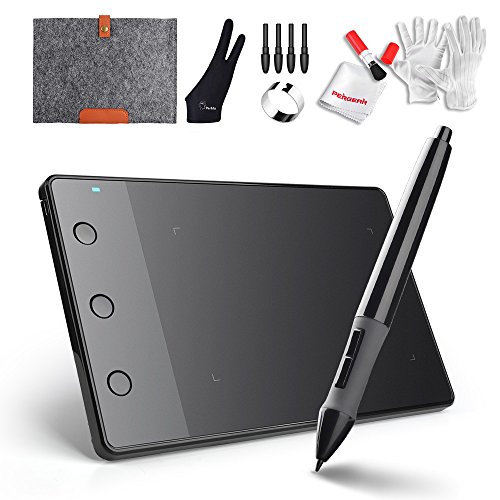
As an Amazon Associate, we earn from qualifying purchases.
The Huion H420 Drawing Pad is the most affordable option. These cheap but highly compatible drawing tablets do the job. They do not have a screen like the other two options.
But, just connect to your laptop and Photoshop or Adobe Illustrator (or any design software) and you are good to go.
They are only around $30 and perfect for somebody testing the illustration waters and not quite ready to invest in an iPad Pro.
I have grouped Options b & c together because the process is very similar, the hardware is different, but you get the same outcome.
All of these products are top-rated in their field for what they do, and although I am biased with my preference for the iPad Pro, any of these will help you achieve the results you are seeking – high-quality digital illustration ready to add to your children’s book manuscript!
Step 1. Sketch your storyboard as you would have with option 1.
Step 2. Take a picture of it on your iPad/tablet or send it to your PC (if using a USB tablet such as the Huion)

Step 3. Trace each frame of you storyboard one by one. It will help greatly if you set the document dimensions according to the size of your book.
For example, if you are creating an 8.5″ by 8.5″ book with bleed, you would set the dimensions to 2550px by 2550px. This will ensure your final illustration fits your manuscript precisely.
Step 4. Colour and shade! This is where the tablets with screens win over the USB interface. The ease of illustrating on Procreate with all the brushes and features makes the process so smooth.
If you are using the USB interface you will be doing the same thing but via Photoshop.

Step 5. Construct your manuscript in your chosen formatting program.
Even if you are not confident in your drawing ability, in the next section, I share tips that will help you illustrate your first children’s picture book.
Stop Staring at a Blank Page
Publy is a distraction-free book editor with AI built in. Brainstorm plot ideas, get instant chapter reviews, or rewrite clunky paragraphs. 3 million free words included.

Option 4 – Hiring a professional illustrator
In this section, you will learn how to get a children’s book illustrated. It is a simple, easy, and probably more affordable option than you might think!
Step 1. Sketch your storyboard (yup, you cannot escape this step :-))
Step 2. Write descriptive text for each frame and save it in a word document. This is what you will send to your illustrator once you hire them. You will not be sending the entire book script!
Step 3. Create an account on Fiverr.
(There are of course other freelancer sites which you can hire a professional illustrator on, however, in my experience, Fiverr has one of the easiest, newbie-friendly interfaces and a very competitive variety of professionals.
Step 4. Browse illustrators and discuss.
Fiverr has thousands of illustration services available – that is a lot to consider. All at varied prices and styles. You will need to pick one that suits your most preferred style and open dialogue with them.
They will be open to seeing your storyboard and anxious to know what you have in mind for your characters, their clothes, skin color, background, image dimensions, etc.
You will likely be paying a set price per inner-page.

Step 5. Hire one and wait.
They will tell you how many days/weeks the job will take and throughout the process they will update you. For example, once they have done the digital ‘line art’ for your sketch, they will message to confirm it with you.
At this point, if you are unhappy with the character’s hair or face etc, you can direct them.
They will need to make changes now before they begin to fill in colour and shade etc. You can request a number of revisions until you are happy and at the end, you will have a professional library of illustrations for your book!

When browsing illustrators on Fiverr, filter by “children’s book illustration” and sort by reviews. Ask for a single test page before committing to the full book. Most illustrators charge $25-$100 per inner page. A 32-page book typically costs $800-$3,200 total. Always get a written agreement on revision limits and ownership rights.
If you are looking for a good illustration or character drawing course, check out my Recommended Products and Services page where I list the best resources for self-published authors as well as beginner-friendly illustration and marketing courses.
Option 5 – AI Generated Book Illustrations ?
If you could have AI create any illustration in seconds, what would you create first?
Perhaps you’d create illustrations for your latest book. Or maybe you’d use it to generate stunning visuals for a presentation quickly.
With Jasper Art, your AI creative sidekick, you can finally turn your imagination into unique images and amazing art in seconds.
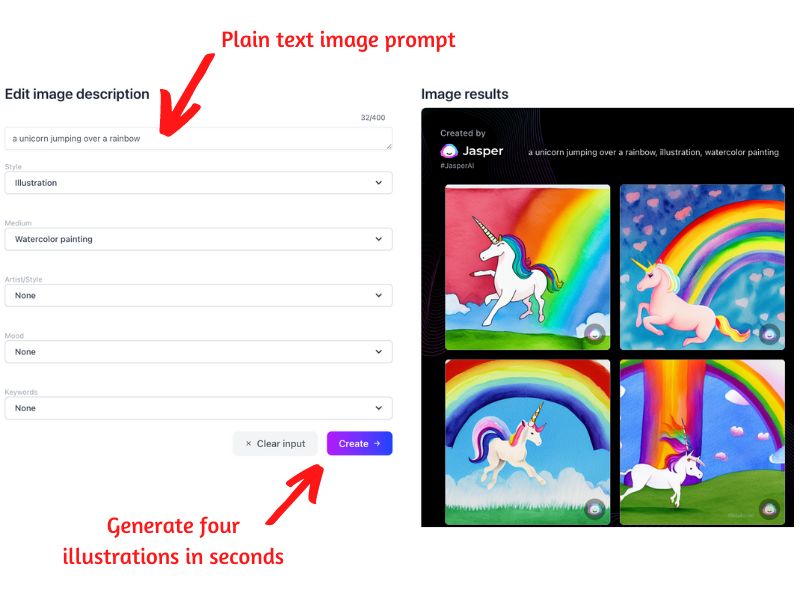
Whether you need a quick picture to match your message or a more complex piece of artwork, Jasper can help. And best of all, you won’t have to wait weeks to get it back and request revisions – Jasper Art can generate new images in seconds.
They offer an UNLIMITED amount of image generations for $20 a month. This is an insane value and because it is unlimited, you can keep generating images until you get your perfect illustrations.
I personally generate illustrations with Jasper Art and then perfect them in Pro Create with my trusty Apple pen. It is a formula ANYBODY can utilize.
Simple Children’s Book Illustrations That Everybody Loves
Remember, your drawings don’t have to be perfect.
Honestly…

It is no secret that simple illustrations are often some of the most effective, especially when it comes to children’s books.
After all, the less clutter on the page, the easier it is for young readers to focus on the story. This might explain why so many of the most popular children’s books feature simple illustrations.
Roald Dahl, Dr. Seuss, and David Williams are just a few who are well-known for their simple yet engaging illustrations.
[quote author=”Roald Dahl”]If you have good thoughts, they will shine out of your face like sunbeams and you will always look lovely.[/quote]
In fact, it is often said that the success of a children’s book depends just as much on the illustrations as it does on the story itself.
So you see, you can keep reading for tips on how to turn your not-so-perfect drawings into illustrations or you can skip right on ahead to Option 4 and be done with it!
Tips to help you illustrate your first children’s picture book
#1 Learn from others
If you are illustrating a children’s picture book for the first time, it will be best to start by learning from others. Thankfully, we live in a time where we have the most revolutionary invention of the ages… The Internet.
The internet has made it possible to learn all sorts of skills, for free! This includes cartooning and illustrating. You can get many educational online tutorials that can provide detailed step-by-step guides on how you sketch, draw, paint and digitally illustrate. There are also some really well-crafted, affordable courses on Udemy which many people hold positive testimonials for.
If online courses and tutorials are not your thing, there are also books that can assist if you. It would be best not to rely on just one book or tutorial but check out several to provide you with maximum advice and current trends.
#2. Be keen on the drawings that inspire you
Do you have your favorite artists?
You can get inspiration from them or any other picture book you find interesting. Look closely at their drawings and think about what makes them appealing to you. Try to integrate some of the features they include in the pictures in your work without copying.
Someone else’s book illustration could help you to develop and shape your unique style.
Seeking out stylistic inspiration from others’ work is a vital part of this process. It would be best to look out for the new picture books in the market. They will make you aware of the current trends and learn what the illustrators are doing to make the books funny, unique, and attractive.
#3. Different Children’s Book Illustration Styles
To learn to illustrate a book, one must first study different children’s book illustration styles. This can be done by looking at different illustrators’ work, attending workshops and classes, and/or practicing on one’s own.
Once an illustrator has a good understanding of the different styles, they can then start to experiment with their own to find a style that fits their work.
By studying different styles, you not only learn how to create your own illustrations but you also gain a better understanding of the field as a whole. With this knowledge, you can then start to create illustrations that are truly unique.
#4. Draw as much as possible
This point may sound obvious, but the secret to perfecting is to keep on practicing drawing. When you keep drawing more and more, you improve over time and are perfect at long last. Many people find it hard due to time constraints, but you should make time for it.
And when you keep on practicing, you will develop a deeper affinity for drawing. You will often want to do it again and again hence naturally finding time to do it.
#5. Focus on character development
The first thing you should do when working on a children’s picture book is come up with the main character. This character is usually featured in every illustration and is ideally the character that connects with the readers.
Exercise drawing the main character using different expressions while in different situations. While practicing, keep in mind that continuity is vital, especially for young readers.
It will help immensely to learn techniques to draw facial expressions easily. Ones that you can replicate again and again with no issues. These will become part of your uniques style and something children can expect to se from your books.
#6. Start with a storyboard.
When you want to illustrate a children’s picture book, but you can’t draw, you should start by making a brief outline of what each illustration should portray.
Go through the book, page by page, while taking notes or making sketches. You will be able to get an overall idea of how best to illustrate your story.
Then, make thumbnail sketches for every page, adding detailed illustrations and the color samples you will use on your final work. This will help you as you construct your masterpiece (or help prepare you to hire a freelancer…)
#7. Seek Feedback
Before you work on your final product, it is very important to get feedback and comments regarding your intended artwork. You can get this from fellow children’s illustrators, friends, family, teachers, authors, or editors.
Take note of the critiques and redraw the illustrations to improve your artwork.
Frequently Asked Questions
How much does it cost to illustrate a children’s book?
Costs range from nearly free (DIY with free tools like Canva or Krita) to $5,000-$20,000+ for a professional illustrator through an agency. On Fiverr, expect $25-$200 per page depending on style and complexity. A typical 32-page picture book costs $800-$6,400 for freelance illustration. AI-assisted illustration can bring this down to under $100 total if you do the refinement work yourself.
How long does it take to illustrate a children’s book?
A 32-page children’s book typically takes 2-6 months for a professional illustrator, depending on style complexity and revision rounds. DIY illustration takes longer for beginners (6-12 months is common for a first book). AI-assisted workflows can compress this to 2-4 weeks if you’re experienced with tools like Procreate for touch-ups.
Can I use AI to illustrate my children’s book?
Yes, but with caveats. Tools like Midjourney and DALL-E 3 can generate children’s book illustrations quickly. The catch: Amazon KDP and many publishers now require disclosure of AI-generated content. Pure AI output also looks generic. The recommended approach in 2026 is to use AI for base compositions, then add hand-drawn elements on top for a unique, human feel.
What is the best software for children’s book illustration?
Procreate (iPad, $12.99 one-time) is the most popular choice among self-published children’s book authors. Other strong options include Adobe Photoshop (desktop, subscription), Clip Studio Paint (desktop/iPad, subscription or one-time), and the free alternative Krita. For complete beginners, Canva offers drag-and-drop illustration features with pre-made character elements.
Should I illustrate my children’s book myself or hire someone?
Hire someone if: your budget allows $1,000+, you want a polished commercial look, or your drawing skills are limited. DIY if: you have artistic ability (even basic), you want a distinctive personal style, or budget is very tight. Many successful children’s books, including bestsellers by authors like Dav Pilkey (Dog Man), use intentionally simple, hand-drawn illustration styles that any committed beginner can learn.